
Tools
Nice to know applications, solutions, services and sites that I often utilize to assist me in my work as an IT-professional
Microsoft Azure Architecture Center
Design solutions on Microsoft Azure using established patterns and practices. Azure Architecture Center is a catalog of solution ideas, example workloads, reference architectures, technology decision guides, and architecture guides for Azure workloads.
- Learn Cloud Design Patterns
- Browse Architectures
- Make Technology Choices
- Deploy Cloud Landing Zones
- Build Applications
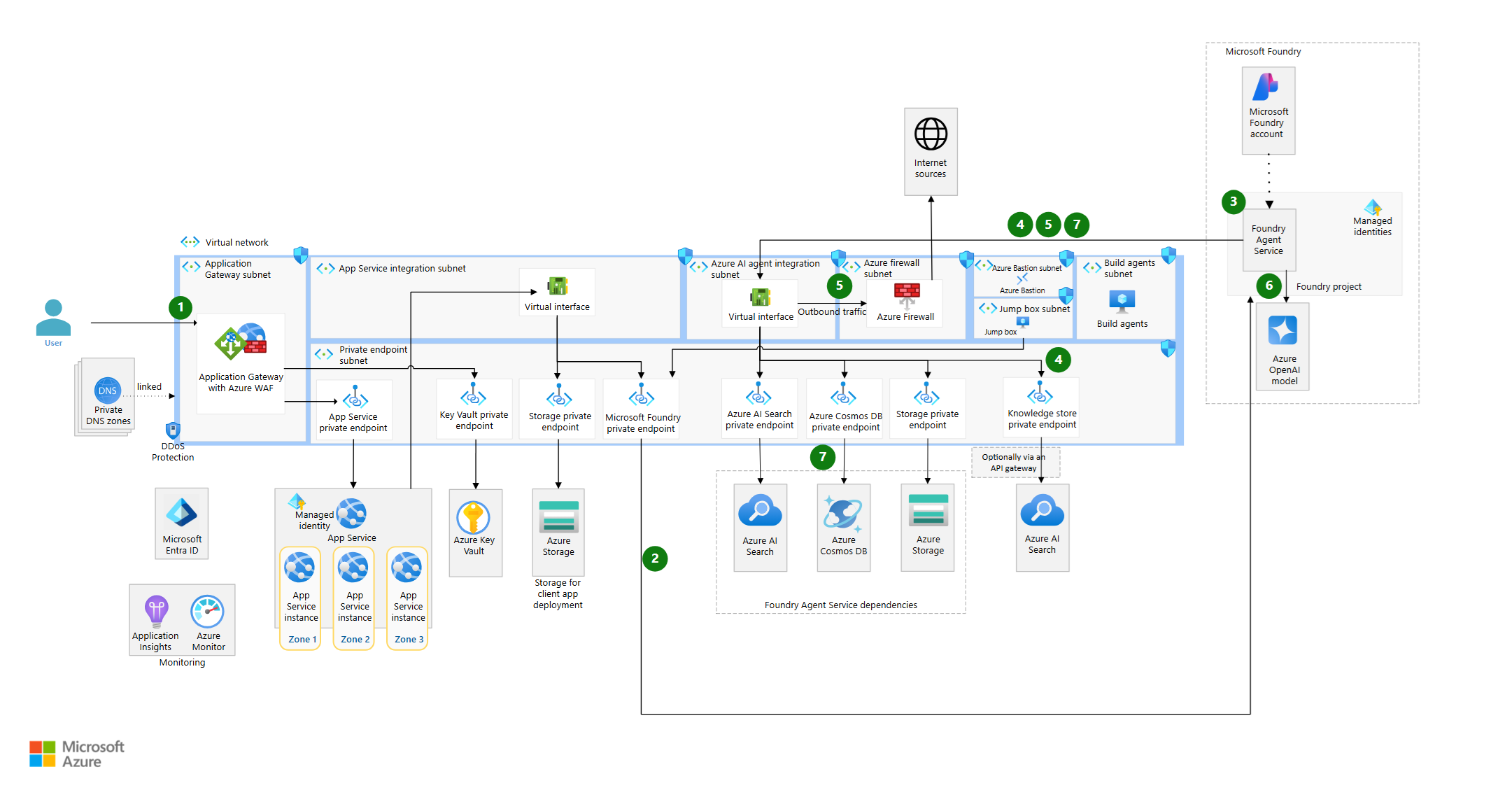
Find architecture diagrams and technology descriptions for reference architectures, real world examples of cloud architectures, and solution ideas for common workloads on Azure, like the following ‘baseline Microsoft Foundry Chat reference architecture’ example.
Technology Areas
Explore architectures and guides for different technologies.
Microsoft Azure DevOps Service
What is DevOps?
DevOps combines development (Dev) and operations (Ops) to unite people, process, and technology in application planning, development, delivery, and operations. DevOps enables coordination and collaboration between formerly siloed roles like development, IT operations, quality engineering, and security.
Teams adopt DevOps culture, practices, and tools to increase confidence in the applications they build, respond better to customer needs, and achieve business goals faster. DevOps helps teams continually provide value to customers by producing better, more reliable products.
DevOps and the Application Lifecycle
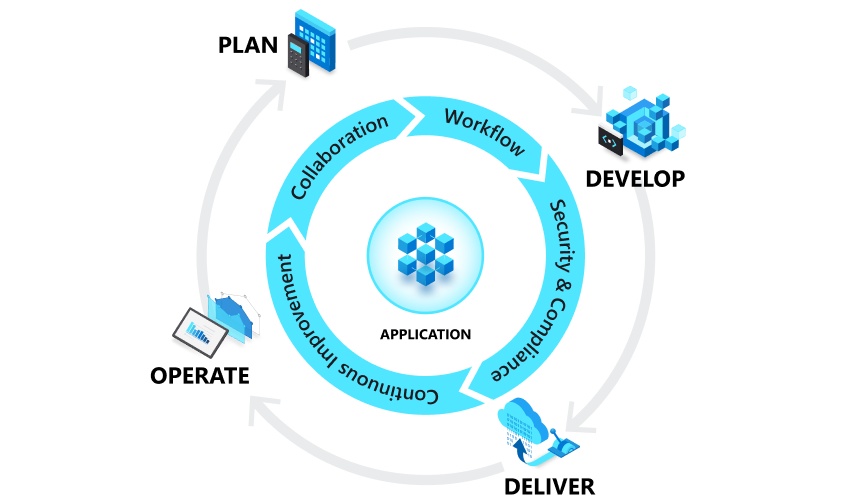
DevOps influences the application lifecycle throughout its planning, development, delivery, and operations phases. Each phase relies on the other phases, and the phases aren’t role-specific. A DevOps culture involves all roles in each phase to some extent.
The following diagram illustrates the phases of the DevOps application lifestyle:
DevOps Goals and Benefits
When a team adopts DevOps culture, practices, and tools, they can achieve amazing things:
Accelerate time to market Through increased efficiencies, improved team collaboration, automation tools, and continuous deployment–teams are able to rapidly reduce the time from product inception to market launch.
Adapt to the market and competition A DevOps culture demands teams have a customer-first focus. By marrying agility, team collaboration, and focus on the customer experience, teams can continuously deliver value to their customers and increase their competitiveness in the marketplace.
Maintain system stability and reliability By adopting continuous improvement practices, teams are able to build in increased stability and reliability of the products and services they deploy. These practices help reduce failures and risk.
Improve the mean time to recovery The mean time to recovery metric indicates how long it takes to to recover from a failure or breach. To manage software failures, security breaches, and continuous improvement plans, teams should measure and work to improve this metric.
Improve Code Quality and Boost Productivity with Azure DevOps
- Azure Artifacts Create, host, and share packages with your team, and easily add artifacts to your CI/CD pipelines with native integrations to Azure Pipelines.
- Azure Boards Track work with configurable Kanban boards. Integrate with GitHub Copilot to kick off a task from Boards and use a coding agent to generate code.
- Azure DevOps MCP Server Enable GitHub Copilot to interact with and operate on work items, pull requests, test plans, builds, releases, and wiki pages in your Azure DevOps projects.
- Azure Managed DevOps Pools Empower development teams to quickly spin up and customize Azure DevOps agent pools, making it easy to implement best security practices, help balance cost and performance, and adopt paths for common DevOps scenarios.
- Azure Pipelines Build, test, and deploy with CI/CD that works with any language, platform, and cloud. Connect to GitHub or any other Git provider and deploy continuously.
- Azure Repos Collaborate to build better code using pull requests and advanced file management with unlimited, cloud-hosted private Git repositories.
- Azure Test Plans Test and ship with confidence using manual and exploratory testing tools.
- GitHub Copilot Code, test, and modernize with help from the most widely adopted AI-developer tool.
- GitHub Advanced Security for Azure DevOps Develop securely from inception to deployment with a suite of security testing tools native to Azure DevOps.
Microsoft Azure Documentation
Learn how to build and manage powerful applications using Microsoft Azure cloud services. Get documentation, example code, tutorials, and more.
Products and services categories:
Microsoft Cybersecurity Reference Architectures (MCRA)
What is Microsoft Cybersecurity Reference Architectures
The Microsoft Cybersecurity Reference Architectures (MCRA) are technical architectures to enable you to adopt end-to-end security using Zero Trust principles. MCRA describes end-to-end security for the ‘hybrid of everything’ technology estate spanning legacy IT, multicloud, Internet of Things (IoT), Operational Technology (OT), Artificial Intelligence (AI), and more.
These reference architectures accelerate planning and execution of security modernization using open standards, Microsoft’s cybersecurity capabilities and technologies, and third-party security technology. MCRA is a component of Microsoft’s Security Adoption Framework (SAF) that describes a complete security modernization approach helps security teams modernize their strategy, governance, technical architecture, and operations using Zero Trust principles.
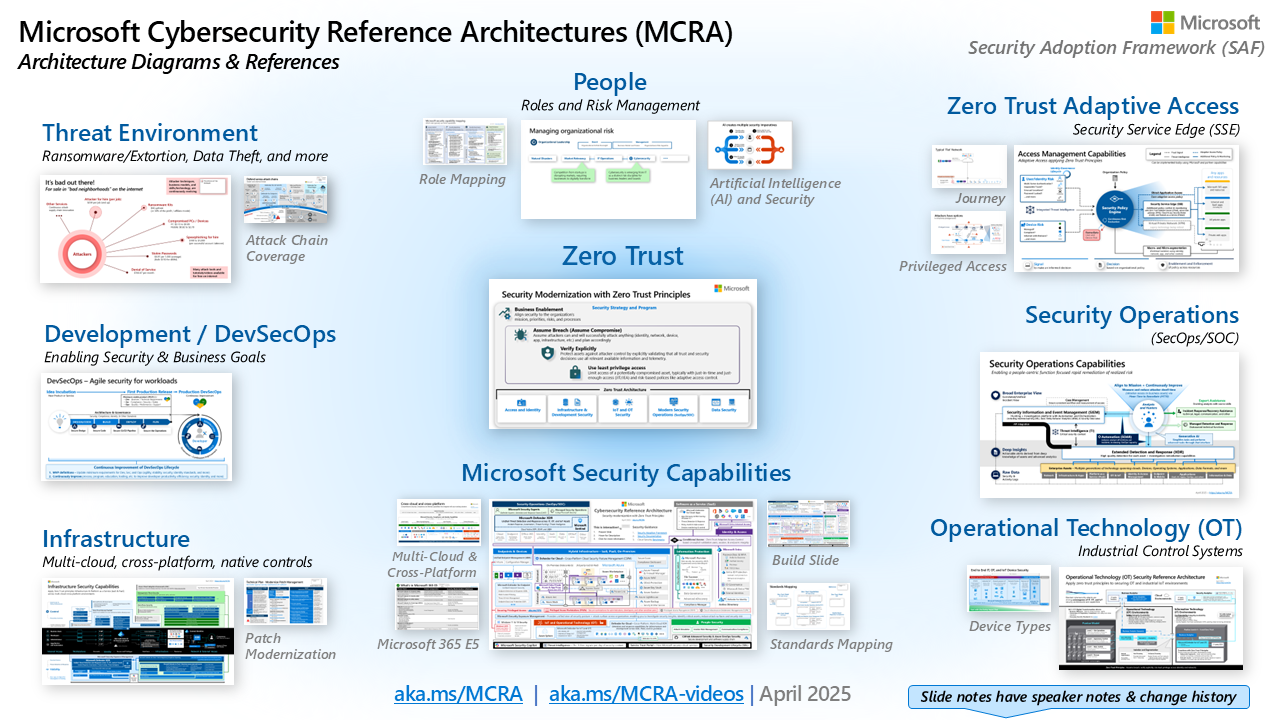
How to use the MCRA
This is typically used for several purposes including:
- Starting template for a security architecture – The most common use case we see is that organizations use the document to help define a target state for cybersecurity capabilities. Organizations find this architecture useful because it covers capabilities across the modern enterprise estate that now spans on-premises, mobile devices, multiple clouds, and IoT / Operational Technology.
- Comparison reference for security capabilities – Some organizations use this resource to compare Microsoft’s recommendations with what they already own and have implemented. Many organizations find that they already own quite a bit of this technology already and weren’t aware of it.
- Learn about Microsoft capabilities – We also see this resource used as a learning tool. In presentation mode, each capability has a “ScreenTip” with a short description of each capability + a link to documentation to learn more.
- Learn about Microsoft’s integration investments – The architecture helps architects and technical teams identify how to take advantage of integration points within Microsoft capabilities and with existing security capabilities.
- Learn about Cybersecurity – Some folks, particularly people new to cybersecurity, use this resource as a learning tool as they prepare for their first career or a career change.
Microsoft Learning Platform
Whether you’re just starting in a career, or you’re an experienced professional, our self-directed approach helps you arrive at your goals faster, with more confidence and at your own pace. Develop skills through interactive modules and paths or learn from an instructor. Learn and grow your way.
Find learning modules based on career path:
- Administrator
- AI Engineer
- App Maker
- Business User
- Data Analyst
- Data Engineer
- Data Scientist
- Developer
- DevOps Engineer
- Functional Consultant
- Identity and Access Administrator
- Information Security Administrator
- Security Operations Analyst
- Security Engineer
- Solutions Architect
Looking for specific training content?
Learn new skills and discover the power of Microsoft products with step-by-step guidance. Start your journey today by exploring our learning paths, modules, and courses.