
Solutions
Modern or innovative cloud solutions that I find really valuable and like to advocate to my peers in the IT industry
Azure Arc (Hybrid and Multicloud Management)
What is Azure Arc?
Today, companies struggle to control and govern increasingly complex environments that extend across datacenters, multiple clouds, and their edge locations. Each environment possesses its own set of management tools, where new DevOps and ITOps operational models can be hard to implement across resources.
Azure Arc simplifies governance and management by delivering a consistent multicloud and on-premises management platform and provides a centralized, unified way to:
Manage your entire environment together by projecting your existing non-Azure and/or on-premises resources into Azure Resource Manager.
Manage virtual machines, and Kubernetes clusters as if they are running in Azure.
Use familiar Azure services and management capabilities, regardless of where your resources live.
Continue using traditional ITOps while introducing DevOps practices to support new cloud native patterns in your environment.
Configure custom locations as an abstraction layer on top of Azure Arc-enabled Kubernetes clusters and cluster extensions.
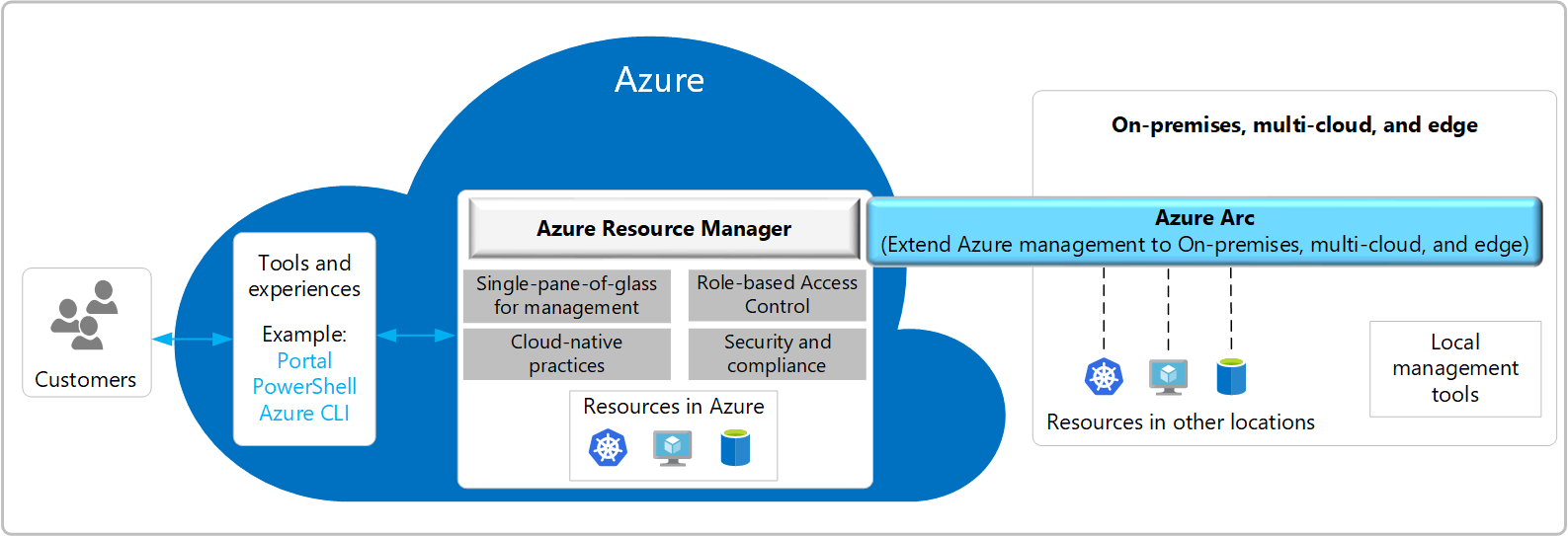
Currently, Azure Arc allows you to manage the following resource types hosted outside of Azure:
Servers and virtual machines: Manage Windows and Linux physical servers and virtual machines hosted outside of Azure.
Kubernetes clusters: Attach and configure Kubernetes clusters running anywhere, with multiple supported distributions.
Key Features and Benefits
Some of the key scenarios that Azure Arc supports are:
Implement consistent inventory, management, governance, and security for servers across your environment.
Configure Azure VM extensions to use Azure management services to monitor, secure, and update your servers.
Manage and govern Kubernetes clusters at scale.
Use GitOps to deploy configurations across one or more clusters from Git repositories.
Zero-touch compliance and configuration for Kubernetes clusters using Azure Policy.
Run Azure data services on any Kubernetes environment as if it runs in Azure (specifically Azure SQL Managed Instance, with benefits such as upgrades, updates, security, and monitoring). Use elastic scale and apply updates without any application downtime, even without continuous connection to Azure.
Create custom locations on top of your Azure Arc-enabled Kubernetes clusters, using them as target locations for deploying Azure services instances.
A unified experience viewing your Azure Arc-enabled resources, whether you are using the Azure portal, the Azure CLI, Azure PowerShell, or Azure REST API.
Azure DevOps (Continuous Integration / Continuous Delivery or Deployment)
What is Azure DevOps?
Azure DevOps is a cloud-based platform that provides integrated tools for software development teams. It includes everything you need to plan work, collaborate on code, build applications, test functionality, and deploy to production.
Azure DevOps offers a spectrum of service models to accommodate the unique needs of every team. The free access version helps small teams get started quickly, while the versatile subscription and pay-per-use plans support comprehensive project management.
Key Characteristics:
End-to-end project management: Azure DevOps stands as a cohesive suite of services designed to support the complete lifecycle of your software projects. It encompasses everything from initial planning and development, through rigorous testing, to final deployment.
Client/server model delivery: Azure DevOps operates on a client/server model, offering flexibility in how you interact with its services. The web interface provides a convenient way to utilize most services and is compatible with all major browsers. Additionally, certain services like source control, build pipelines, and work tracking offer client-based management options for enhanced control.
Flexible and scalable service options: Azure DevOps caters to teams of all sizes by offering a range of service options. For small teams, many services are complimentary, ensuring that you have access to robust project management tools without any initial investment. For larger teams or more advanced needs, services are accessible through a subscription model or on a pay-per-use basis.
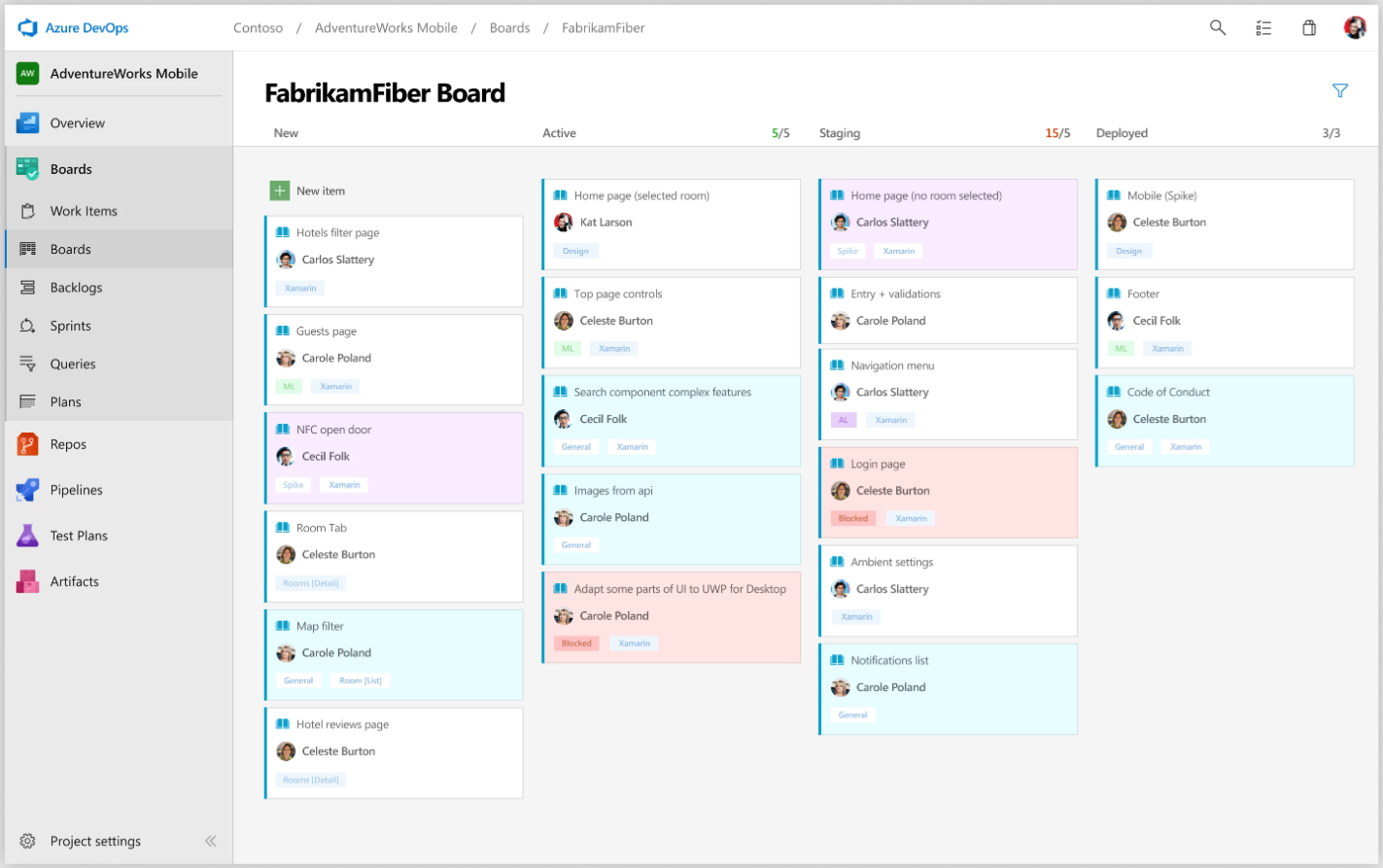
- Azure Boards: Plan and track work using Agile tools, Kanban boards, backlogs, and dashboards. Create work items like user stories, bugs, and tasks. Use sprint planning, burndown charts, and velocity tracking. Customize workflows and work item types to match your team’s process.
- Azure Repos: Host unlimited private Git repositories or use Team Foundation Version Control (TFVC) for source code management. Features include branch policies, pull requests with code reviews, conflict resolution, and integration with popular IDEs and editors.
- Azure Pipelines: Build, test, and deploy applications with CI/CD pipelines that work with any language, platform, and cloud. Supports Docker containers, Kubernetes, and deployments to Azure, AWS, Google Cloud, or on-premises. Includes parallel jobs, deployment gates, and release approvals.
- Azure Test Plans: Plan, execute, and track testing with manual test cases, exploratory testing sessions, and automated test integration. Create test suites, track test results, capture screenshots and videos, and generate detailed test reports.
- Azure Artifacts: Create, host, and share packages like NuGet, npm, Maven, Python, and Universal packages with your team and organization. Integrate with build pipelines, manage package versions, and control access with upstream sources and retention policies.
Azure DevOps Services offers several advantages for development teams:
- Quick setup: Start using Azure DevOps immediately without infrastructure setup or maintenance
- Automatic updates: Get the latest features and security updates without manual intervention
- Global scale: Built on Azure’s global infrastructure with 99.9% SLA
- Security: Enterprise-grade security with Microsoft Entra ID integration, compliance certifications, and data protection
- Integration: Works with GitHub, Visual Studio, VS Code, and hundreds of extensions from the marketplace
- Flexibility: Support for any development stack, language, or platform
- Collaboration: Remove barriers between teams and encourage collaboration across the entire development lifecycle
- Free for small teams: Up to five users get access to all basic features
- Pay-as-you-grow: Add users with Basic or Basic + Test Plans licenses as needed
- Unlimited stakeholders: Free access for unlimited stakeholders to view dashboards and work items
Microsoft Foundry (AI Development and Operations)
What is Microsoft Foundry?
Microsoft Foundry is a unified Azure platform-as-a-service offering for enterprise AI operations, model builders, and application development. This foundation combines production-grade infrastructure with friendly interfaces, enabling developers to focus on building applications rather than managing infrastructure.
Microsoft Foundry unifies agents, models, and tools under a single management grouping with built-in enterprise-readiness capabilities including tracing, monitoring, evaluations, and customizable enterprise setup configurations. The platform provides streamlined management through unified Role-based access control (RBAC), networking, and policies under one Azure resource provider namespace.
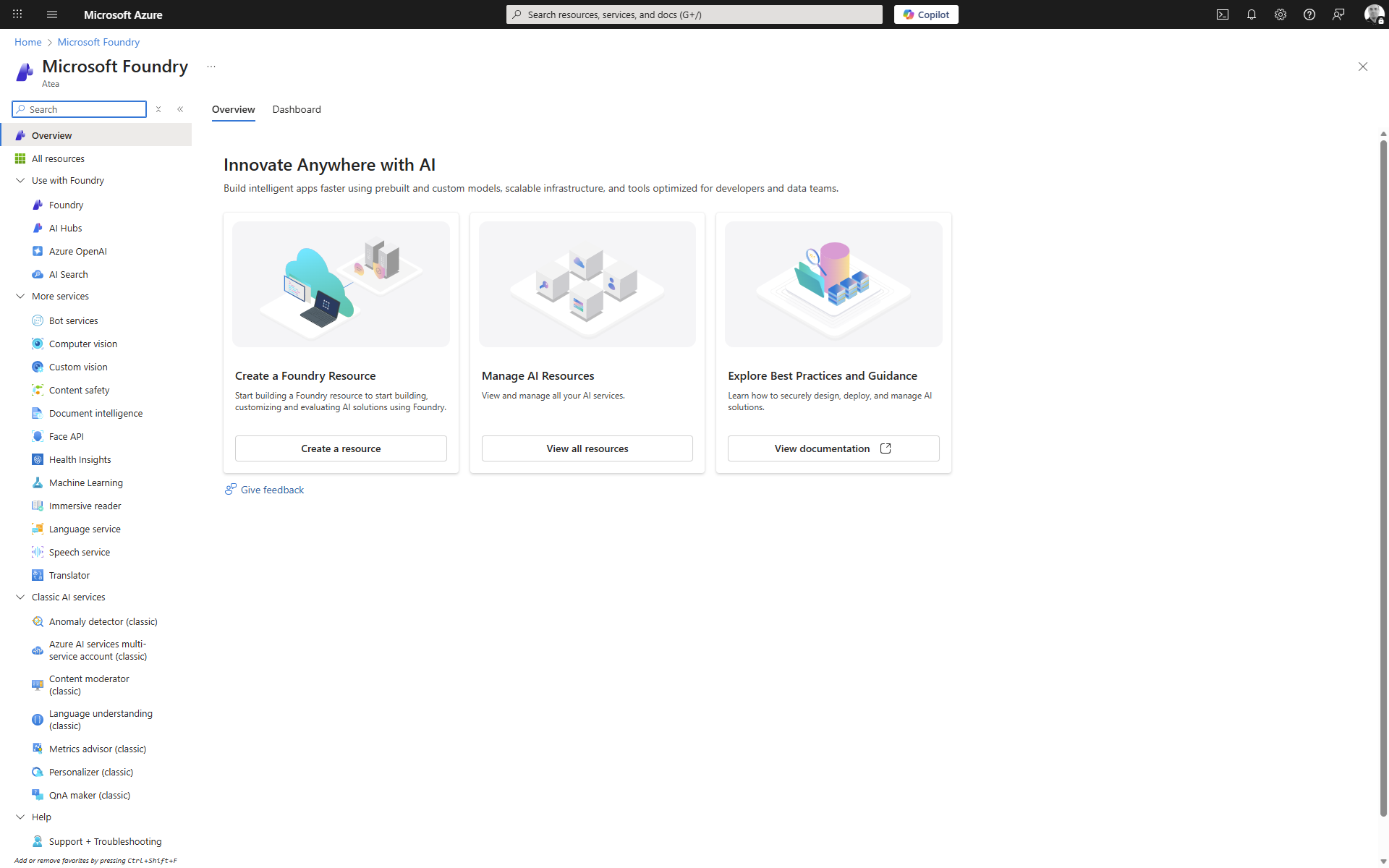
Microsoft Foundry Portals
There are currently two different portals for you to use to interact with Microsoft Foundry. A toggle in the portal banner allows you to switch between the two versions.
- Microsoft Foundry (classic) Choose this portal when working with multiple resource types: Azure OpenAI, Foundry resources, hub-based projects, or Foundry projects.
- Microsoft Foundry (new) Choose this portal for a seamless experience that combines simplicity with powerful and secure tools to build, manage and grow multi-agent applications. Only Foundry projects are visible here – use (classic) for all other resource types.
Foundry Projects
A Foundry project is where you do most of your development work. You can work with your project in the Foundry portal, or use the SDK in your preferred development environment.
Foundry projects provide developers with self-serve capabilities to independently create new environments for exploring ideas and building prototypes, while managing data in isolation. Projects act as secure units of isolation and collaboration where agents share file storage, thread storage (conversation history), and search indexes. You can also bring your own Azure resources for compliance and control over sensitive data.
Microsoft Foundry Models
Microsoft Foundry Models is your one-stop destination for discovering, evaluating, and deploying powerful AI models—whether you’re building a custom copilot, building an agent, enhancing an existing application, or exploring new AI capabilities.
With Foundry Models, you can:
- Explore a rich catalog of cutting-edge models from Microsoft, OpenAI, DeepSeek, Hugging Face, Meta, and more.
- Compare and evaluate models side-by-side using real-world tasks and your own data.
- Deploy with confidence, thanks to built-in tools for fine-tuning, observability, and responsible AI.
- Choose your path—bring your own model, use a hosted one, or integrate seamlessly with Azure services.
- Whether you’re a developer, data scientist, or enterprise architect, Foundry Models gives you the flexibility and control to build AI solutions that scale—securely, responsibly, and fast.
Foundry offers a comprehensive catalog of AI models. There are over 1900+ models ranging from Foundation Models, Reasoning Models, Small Language Models, Multimodal Models, Domain Specific Models, Industry Models and more.
The catalog is organized into two main categories:
Foundry Agent Service
Most businesses don’t want just chatbots. They want automation that’s faster and has fewer errors. That might mean summarizing documents, processing invoices, managing support tickets, or publishing blog posts. In all cases, the goal is the same: freeing people and resources to focus on higher-value work by offloading repetitive and predictable tasks.
Large language models (LLMs) introduced a new type of automation with systems that can understand unstructured data, make decisions, and generate content. In practice, businesses can have difficulty moving beyond demos and into production. LLMs can drift, be incorrect, and lack accountability. Without visibility, policy enforcement, and orchestration, these models are hard to trust in real business workflows.
Foundry Agent Service connects the core pieces of Foundry (such as models, tools, and frameworks) into a single runtime. It manages conversations, orchestrates tool calls, enforces content safety, and integrates with identity, networking, and observability systems. These activities help ensure that agents are secure, scalable, and production ready.
By abstracting away infrastructure complexity and enforcing trust and safety by design, Foundry Agent Service can help you move from prototype to production with confidence.
To get started with Foundry Agent Service, you need to create a Foundry project in your Azure subscription.
here are some links to get up and running with the environment setup and quickstart guides if it’s your first time using the service.
Pricing and Billing
Microsoft Foundry is monetized through individual products customer access and consume in the platform, including API and models, complete AI toolchain, and responsible AI and enterprise grade production at scale products. Each product has its own billing model and price.
The platform is free to use and explore. Pricing occurs at deployment level.
Using Foundry also incurs cost associated with the underlying services. To learn more, read Plan and manage costs for Foundry Tools.
Microsoft Sentinel (Security Information and Event Management)
What is Microsoft Sentinel?
Microsoft Sentinel is a cloud-native Security Information and Event Management (SIEM) and unified security platform for agentic defense. To meet the demands of today’s complex threats, Microsoft Sentinel has evolved from a traditional SIEM to a SIEM and platform – extending beyond static, rule-based controls and post-breach response to provide an AI-ready, data-first foundation that transforms telemetry into a security graph, standardizes access for agents, and coordinates autonomous actions, while keeping humans in command of strategy and high impact investigations.
As a SIEM, Microsoft Sentinel delivers AI-driven security across multicloud and multiplatform environments, offering robust capabilities for threat detection, investigation, hunting, response, and automated attack disruption. As a platform, Microsoft Sentinel provides a foundation built on a modern data lake for deep insights, graph capabilities for contextual analysis, a hosted Model Context Protocol (MCP) server for agent-ready tooling, and developer capabilities for building and deploying solutions through the Security Store.
This article provides an overview of Microsoft Sentinel and its core components. It explains how Microsoft Sentinel helps security operations teams detect and respond to threats, and adapt continuously by unifying data, automating responses, and deriving AI-driven insights.
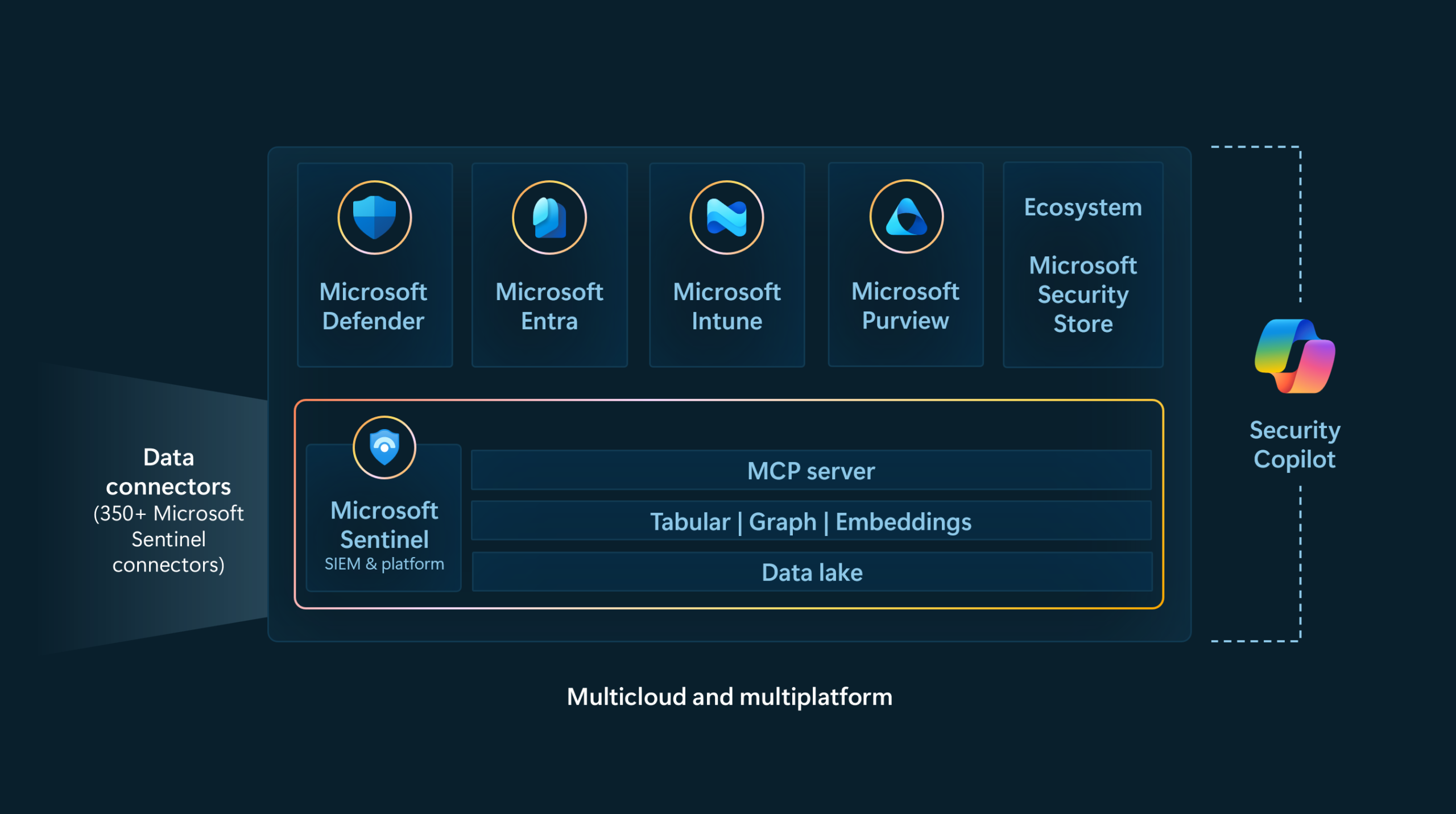
Data Connectors
Collect data across your entire digital estate wherever the data resides, including all users, devices, applications, and infrastructure, both on-premises and in multiple clouds:
-
350+ out-of-the-box data connectors with support for first and third-party security solutions and cloud platforms
-
A built-in table management experience that simplifies selecting data storage, supporting tiered placement across analytic and data lake tiers.
-
Data ingested into the analytics tier is automatically mirrored in the data lake tier, ensuring data lake tier remains the central, unified repository for all security data.
-
No-code and custom connector options
-
Data normalization to translate various sources into a uniform, normalized view
For more information, see Microsoft Sentinel data connectors.
Microsoft Sentinel Graph
Microsoft Sentinel graph provides unified graph analytics capability by modeling and analyzing complex relationships across assets, identities, activities, and threat intelligence. It enables Microsoft Defenders and AI agents to reason over interconnected data, offering deeper insights and faster response to cyber threats.
Microsoft Sentinel graph’s key capabilities include:
-
Unified graph-based analytics that power built-in experiences across security, compliance, identity, and the Microsoft Security ecosystem.
-
Real-world relationship modeling that uses nodes and edges to represent users, devices, cloud resources, data flows, and attacker actions.
-
Enhanced threat reasoning to help Defenders answer complex questions, such as which vulnerable paths an attacker could take from a compromised entity to a critical asset.
-
End-to-end defense with support for both pre-breach and post-breach scenarios, using interconnected graphs across Microsoft Defender and Microsoft Purview.
For more information, see What is Microsoft Sentinel graph?.