
Model Context Protocol (MCP): Why, What and How?

Artificial Intelligence is increasingly being used to power business assistants, agents, and automated workflows, but one key challenge remains: connecting these AI models to the vast array of external data sources, tools, and services that organizations use every day. For these use cases the Model Context Protocol (MCP) has emerged as a foundational solution to this challenge. MCP is an open-source standard (developed under the Linux Foundation) that acts like a universal connector for AI applications. Introduced by Anthropic in November 2024, the protocol acts as a “universal plug-in” that replaces the need for unique, custom-built integrations for each new data source and has since then been widely adopted by AI-solution developers.
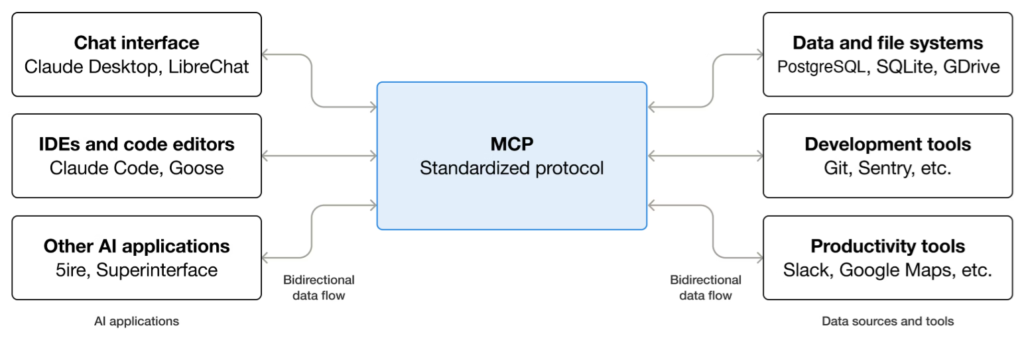
Artificial intelligence is increasingly being used to power business assistants, agents, and automated workflows, but one key challenge remains: connecting these AI models to the vast array of external data sources, tools, and services that organizations use every day. The Model Context Protocol (MCP) has emerged as a foundational solution to this challenge. MCP is an open-source standard (developed under the Linux Foundation) that acts like a universal connector for AI applications – much like a USB-C port for devices – providing a standard way for AI systems to plug into external systems and access information or perform actions. By adopting MCP, companies can enable their AI-powered agents (such as chatbots, assistants, or copilots) to interface with business applications, databases, cloud services, and more without bespoke integrations for each tool.
Popular use cases and benefits of MCP span many scenarios in both small and mid-sized business and large enterprise contexts
 
For example, MCP can enable AI-driven solutions to:
  • Personalized AI Assistants: Agents can access personal data like calendars or note-taking apps (e.g. Google Calendar, Notion) to act as tailored digital assistants, automating everyday scheduling and information retrieval tasks.

  • Automated Development Workflows: LLM-based coding tools can leverage design files or project data (for example, a Figma design or code repository) to generate and manage software, accelerating development cycles.

  • Enterprise Knowledge Chatbots: Business chatbots can connect to multiple internal databases and analytics services across an organization, empowering employees to query and analyze corporate data through natural language conversations.

  • AI-Driven Operations: AI models interfaced with operational systems (from IT helpdesk tools to IoT devices) can trigger real-world actions – for example, creating a 3D model in CAD software and sending it to a 3D printer – all under appropriate human oversight.

These examples illustrate how MCP serves as a building block for AI innovation in practical settings. By standardizing how AI agents access tools and data, MCP significantly reduces development time and integration complexity for developers. Instead of writing custom connectors for each new API or database, developers can rely on MCP’s unified approach to plug an AI system into different resources quickly. For the AI applications or agents themselves, MCP opens up an ecosystem of capabilities – they can seamlessly tap into anything from enterprise knowledge bases to cloud services – which dramatically enhances their functionality and the user experiences they can deliver. Finally, for end-users, this means more powerful AI assistants that can not only answer questions, but also execute tasks on their behalf (with permission), like scheduling meetings, retrieving business reports, or updating records in an application.
 
Importantly, the advantages of MCP apply to organizations of all sizes. For SMBs, MCP-based solutions offer a fast path to connect AI platforms (like Microsoft Copilot Agents) with everyday apps and cloud services without heavy custom development. For large enterprises, MCP provides a standardized layer to integrate myriad internal systems (CRM, ERP, databases, IT service management tools, etc.) with AI agents in a governed, scalable way. In both cases, MCP serves as a foundational technology that accelerates time-to-value for AI projects by enabling rapid extension of AI capabilities while maintaining consistent interfaces and control.
 
At its core, MCP uses a modular client–server architecture to bridge AI models with external systems. The primary participants in this architecture include:
  • MCP Host – the AI application or agent that needs external data or actions (for example, an AI assistant in an enterprise chat app, or an AI-powered IDE like Visual Studio Code’s Copilot). The host is essentially the environment where the AI model runs and interacts with users.
  • MCP Server – a service that provides context and capabilities to the AI. An MCP server can wrap around a particular data source, tool, or service (such as a file system, a database, a CRM system, an email/Calendar API, etc.), exposing those capabilities in a standardized way for the AI to use.
  • MCP Client – a component within the host that manages the connection to a specific MCP server. The host will typically create one MCP client per server it connects to, handling the communication details. In essence, the MCP client is like a translator or conduit between the AI (host) and the external service (server).
This design allows a single AI host to interface with multiple servers simultaneously – for instance, an AI agent could connect to a file system server, a database server, a calendar server, and a cloud service server all at once, each providing different functionality. The MCP specification defines how these clients and servers communicate, so that any MCP-compliant host can talk to any MCP-compliant server, regardless of the programming language or platform used to implement either.
 
MCP servers can run locally or remotely. A “local” server might be a program running on the same machine as the AI (using a fast, direct inter-process communication), whereas a “remote” server could be a web service running in the cloud or on another server. In both cases, from the perspective of the AI, they work the same way – the difference is just how the connection is made. This flexibility means an AI agent can tap into local resources (e.g. files on a user’s computer) as well as remote services (e.g. an enterprise SaaS application’s API) using the same protocol.
Communication and Data Exchange: The MCP protocol is built on a two-layer design. The inner data layer defines the content and structure of messages between the client and server, using a JSON-based Remote Procedure Call (JSON-RPC 2.0) format for requests and responses. This data layer specifies how an AI agent can list available tools, request to use a tool, read a resource, receive a prompt, and so on. On top of this sits the transport layer, which handles how those JSON-formatted messages physically get delivered, including connection management and authentication.
 
MCP currently supports two main transport mechanisms:
  • Stdio (Standard I/O) Transport: The MCP server process runs locally (on the same host machine), and communication occurs through standard input/output streams. This method has low latency because there’s no network overhead – it’s ideal for local plugins or extensions (for example, an MCP server that provides access to a local file system or local hardware).
  • Streamable HTTP Transport: The MCP server runs as a web service (for example, in the cloud or on another machine), communicating via HTTP requests. The client sends HTTP POST requests to the server’s endpoints for each RPC call, and the server can optionally use Server-Sent Events (SSE) to stream realtime responses back. This transport mode supports secure communication and standard auth mechanisms (like API keys, OAuth tokens, etc.), making it suitable for remote or cloud-hosted tools.
No matter the transport, the message format and protocol semantics remain consistent, ensuring that an AI agent doesn’t need to care how the server is hosted or reached. This design decision allows MCP to be easily adapted to different deployment environments – from on-premises setups to cloud services – without changing the way AI and tools talk to each other.
 
Core MCP Capabilities: What exactly does an MCP server provide to an AI application? According to the MCP standard, a server can expose three kinds of capabilities to an AI host:
  • Tools: Functions or actions that the AI can call programmatically. Tools might include operations like querying a database, sending a message via an API, creating a calendar event, or running a computation. Each tool comes with a name, description, and a schema for its input and output parameters, so the AI (and the user) knows what it does. The AI model can decide if and when to use these tools based on the conversation or task at hand. Critically, MCP (and platforms that use it) support human oversight for tool usage – for example, the system can require user approval before executing a tool, to ensure safety and compliance.
  • Resources: Read-only contextual data sources that the AI can access. These are like files or information feeds that the AI can retrieve to inform its responses. Examples include documents, knowledge base articles, database records, or even API endpoints that return data. Each resource is typically identified by a URI and can be fetched (or queried) by the AI through the MCP connection. This allows an agent to pull in relevant information on the fly – e.g. retrieving a product spec sheet from a document repository when asked a question about product details.
  • Prompts: Pre-defined prompt templates or actions that can guide the AI’s behavior. These are like “canned” workflows or conversation templates that the server can provide to help the AI perform specialized tasks. For instance, a prompt might define how to structure a step-by-step reasoning process for a complex task, or provide a template for an email or report. Prompts help standardize complex interactions so that the AI doesn’t have to generate such structures from scratch each time.
By breaking capabilities into these categories, MCP makes it easier to integrate a wide variety of services in a uniform way. An MCP server for a customer relationship management (CRM) database might provide tools like lookupCustomerRecord or updateLeadStatus and resources like a customer data schema or recent transaction logs. Meanwhile, an MCP server for a DevOps platform might provide tools such as createIssue, runPipeline, or resources listing deployment history. In both cases, the AI agent can query the list of available tools/resources, understand their purpose and required inputs, and use them as needed – all through the standard MCP interface. This consistency across different services is what makes MCP so powerful.
 
Design Considerations: MCP’s design was informed by the need for extensibility and security in AI integrations. Because it’s an open protocol, any vendor or developer can create an MCP-compliant server – there are already official SDKs in multiple languages (Python, TypeScript/Node.js, Java, C#/.NET, etc.) to streamline this process. The open standard nature ensures no one is “locked in” to a single provider’s ecosystem; an AI host could connect to both open-source community MCP servers and proprietary vendor-provided servers in parallel. The protocol defines standard handshake and capability-discovery processes so that a host can negotiate with a server about what tools/resources are available and what versions of the protocol are supported.
 
MCP also takes security and governance into account: it allows clients (the AI hosts) to mediate and control the AI’s access to tools. For example, a client application can present UI controls to let a human user enable or disable certain tools, or it can enforce that certain high-impact tools require explicit user approval each time. Logging mechanisms can record every tool invocation and resource access. In practice, this means an enterprise can confidently add powerful tools (like the ability to send emails or modify databases) to an AI assistant, knowing that there are checks and balances in place to prevent misuse.
 
Implementing an MCP-powered solution involves setting up MCP servers and connecting them to your AI agent platform. The good news is that you don’t always have to build everything yourself – there’s a growing number of ready-made MCP servers and integration options.
 
Leverage existing MCP Servers: Check if a suitable MCP server already exists for the service or data you need. The community and major tech providers have started creating MCP servers for many common platforms. For example, Microsoft has published a catalog of official MCP server implementations covering things like Azure cloud services, Microsoft 365 (Office/Graph APIs), Azure DevOps, and more – all exposed through the same MCP interface. Adopting an existing server (when it matches your use-case) can jump-start your project. These servers can often be deployed via container or run as services with minimal configuration.
 
Integrating via Microsoft Copilot Studio: If you are working with Microsoft’s ecosystem (for example, building AI copilots that integrate with Office 365 or other Microsoft 365 services), Copilot Studio makes MCP integration straightforward. You can register an MCP server through Copilot Studio’s interface (using the “Add a tool” or MCP connection wizard). Once your agent is connected to an MCP server, all of that server’s declared tools and resources become available to use in your Copilot’s prompts and skills. The agent automatically pulls in each tool’s name, description, input parameters, and output schema from the MCP server’s metadata. As the official documentation notes, Copilot Studio currently supports MCP Tools and Resources (with Prompt support likely expanding in the future) – meaning your connected server can expose functions to call and data to read, which the Copilot can then leverage in its reasoning process. For example, you might connect a Salesforce CRM MCP server to your sales support Copilot; your Copilot can then use the CRM’s query tools or pull customer data as needed during chat, without any custom integration code. This capability is delivered natively by the platform, so the transition from connecting an MCP server to having new AI capabilities is seamless.
 
Integrating via Azure AI Foundry: Another platform embracing MCP is Microsoft’s Azure AI Foundry. Foundry is a cloud service for orchestrating AI agents (with more fine-grained control and enterprise integration points). In Foundry, you can extend an agent by attaching one or more MCP servers as tools. Through the Azure AI Foundry portal or SDK, you provide the MCP server’s endpoint URL and a security token, and the agent will be able to invoke that server’s tools during conversations. This bring-your-own-server approach allows you to incorporate virtually any REST-accessible MCP service into your AI solutions. You can even mix multiple MCP servers in one agent – for instance, an enterprise could attach a GitHub MCP server (to enable code retrieval and CI/CD actions) and a ServiceNow ITSM MCP server (to enable ticketing actions) to the same agent, giving it a wide repertoire of actions. Azure AI Foundry includes settings to define which tools from a connected MCP server are allowed, and supports passing required authentication headers or API keys to securely access the server’s functionality.
It’s also worth noting that Microsoft has introduced a Foundry MCP Server (Preview) – a Microsoft-hosted MCP service at https://mcp.ai.azure.com – which surfaces a set of curated Azure and AI platform tools for any Foundry agent to use. This hosted MCP server is essentially a ready-made hub of Azure capabilities: it lets your agent perform tasks like managing Azure AI models, retrieving information about deployed applications, or interacting with cognitive services, all through standard MCP tools. Because it’s an official service, it handles authentication via Microsoft Entra ID (Azure AD) and respects the user’s permissions, so any action the AI takes through this server is governed by your enterprise security controls. By connecting a Foundry agent to the Foundry MCP Server, teams can immediately empower their AI with a broad range of cloud-based tools without deploying any custom infrastructure – ideal for quickly prototyping solutions that leverage existing Azure services.
 
Building and Deploying MCP Servers: In cases where you need a custom integration – for example, connecting a proprietary database or an internal API for which no MCP server exists – you can build your own MCP server. The MCP open-source project provides SDKs and templates for multiple languages to help with this. Developers can follow official tutorials (for instance, creating a simple “weather info” MCP server in Python) to understand how to define Tools/Resources and stand up an MCP endpoint. Essentially, your code will wrap around the target system’s API or data and present a set of MCP-compliant interfaces (with the proper schemas and communication logic).
 
After developing an MCP server, you’ll need to deploy it in a reliable environment. The goal is to have an endpoint (for example, an HTTPS URL) that your AI agent can reach. Many teams choose to host MCP servers in the cloud for scalability and ease of integration. One convenient option is using Microsoft Azure Functions, which is a serverless platform that can host your MCP server code. By deploying an MCP server as an Azure Function, you get automatic scaling, pay-per-use cost efficiency, and built-in integration with Azure’s identity and security features (so your MCP server can, for example, easily validate Azure AD tokens or use managed identities to access other services). Microsoft’s Azure AI Foundry documentation provides a step-by-step example of creating an MCP server on Azure Functions and registering it so your Foundry agent can use it.
 
For scenarios requiring more control or higher throughput, you can also deploy MCP servers as containerized services. Because MCP servers are essentially microservices, you could run them on Azure Container Apps, Azure Kubernetes Service (AKS), or any Kubernetes cluster (cloud or on-premises). This approach might be suitable if you need to run multiple MCP servers and manage them as a part of a larger microservices architecture, or if you have existing infrastructure on Kubernetes. In an on-premise or hybrid cloud environment, running MCP servers on your own servers or VMs is also possible – the only requirement is that the AI “host” (or agent platform) can reach the server’s endpoint.
 
Security and Governance: As you integrate MCP into business workflows, it’s critical to enforce strong security practices. MCP’s design allows for secure communication (especially with remote servers) via HTTPS and supports authentication methods like API keys and OAuth tokens. When deploying your own MCP server, you should require authentication for any sensitive tool or resource access (for example, by validating tokens or API keys passed from the AI client). Follow the principle of least privilege, ensuring your MCP server only performs actions that it needs to and only exposes non-sensitive data unless properly authorized. Additionally, make use of logging and monitoring: record which MCP tools are being called and by whom, so you have an audit trail of AI-driven actions. Platforms like Azure provide services (e.g. Azure Monitor, logging in Azure Functions) to help capture these details. By combining MCP’s built-in consent mechanisms (like user approval prompts for certain tools) with enterprise security controls, organizations can confidently integrate powerful AI-driven automations without compromising governance.
 
In conclusion, the Model Context Protocol is a game-changer for those looking to extend AI systems with real-world actions and data access. In summary, MCP provides a standardized, flexible way for AI assistants and agents to connect with virtually any external service – enabling everything from quick wins (like a chatbot that can schedule meetings or pull data from a spreadsheet) to complex multi-system enterprise AI workflows. By dividing responsibilities between AI hosts and servers, MCP makes it easier to scale and manage these integrations as your needs grow. Major platforms such as Microsoft’s Copilot Studio and Azure AI Foundry have embraced MCP, demonstrating its growing importance in the industry. Whether you are an IT decision-maker evaluating how to enable smarter business processes, a cloud architect designing the next-generation enterprise stack, or a data/AI professional building a proof-of-concept, MCP offers a blend of technical robustness and business agility. It accelerates development while maintaining security and control, making it a foundational building block for AI innovation in organizations of all sizes.
All Rights Reserved @ DOWI.dk (2025)
BACK TO TOP